Plan your website

So you want a website? Start here.

Before you buy anything or pick a builder, take two minutes to decide what your site needs to do and how you’d like to make it. Then follow the route that fits — every one ends with a website at your own address.
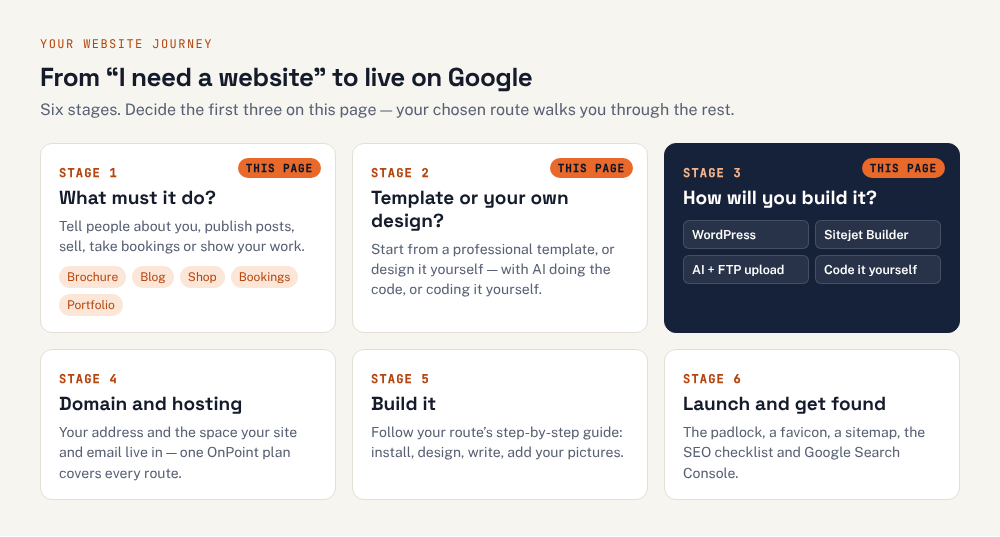
The website journey in six stages: 1 decide what your site needs to do; 2 choose a template or your own design; 3 choose how to build it — WordPress, Sitejet Builder, AI with FTP upload, or code it yourself; 4 get your domain and hosting; 5 build it; 6 launch and get found on Google.
Six stages from idea to a live website. This page covers the first three; the route you choose covers the rest.

Choosing answers highlights the best way to build for you below. Nothing is sent anywhere.

1What does your website need to do?

Tick everything that applies.

Tell people who we are and how to reach us. You’ll need: 4–6 pages, a contact form, your phone number and address, and a privacy policy. Every way of building can do this well.

Publish articles or news regularly. You’ll need: an easy way to write and publish posts, categories, and a list of recent posts that updates itself. WordPress was made for this.

Sell products online. You’ll need: product pages, a basket, secure card payments (for example Stripe or PayPal), delivery costs and VAT. WordPress with WooCommerce is free and flexible; Sitejet’s shop is a paid add-on.

Take bookings or appointments. You’ll need: a calendar people can book from, with confirmation emails. WordPress has booking plugins; any site can link to or embed an online booking service.

Show off my work. You’ll need: large, fast-loading images and a clean layout that lets the work speak. Any way works; AI and Sitejet give the most striking results quickest.

2How do you want it to look?

Templates are professionally designed starting points; your own design means you decide everything.

3

How will you build it?

Four good ways, all running on the same OnPoint hosting. Each has its own step-by-step guide.

Best fit

WordPress

The world’s most popular website software — themes for the look, plugins for everything else.

Best for
Blogs, shops, bookings and sites that will grow
Time to a first site
A day or a weekend
Cost
Free software; optional paid themes and plugins
  • Thousands of free themes and plugins: shop, bookings, forms, galleries
  • Best choice for a blog or an online shop (WooCommerce)
  • You and your staff edit pages from a dashboard
  • Needs regular updates, or it becomes a security risk
  • Too many plugins slow it down or clash
Build with WordPress
Best fit

Sitejet Builder

Drag-and-drop builder in your OnPoint cPanel — pick a template, change the words and pictures, publish.

Best for
Brochure sites, small businesses, portfolios — quickly
Time to a first site
An afternoon
Cost
Included with OnPoint hosting (shop features are a paid add-on)
  • Included in your OnPoint cPanel at no extra cost
  • Professionally designed templates and free stock photos
  • AI help writing your text
  • Fewer add-ons than WordPress
  • Online shop features need a paid add-on
Build with Sitejet Builder
Best fit

Build it with AI

Describe the site you want to an AI assistant such as Claude, check the pages it writes, and upload them to your hosting.

Best for
Custom-looking brochure and portfolio sites, fast
Time to a first site
An afternoon to a few days
Cost
Free or a monthly AI subscription
  • A design that looks like nobody else’s
  • Plain HTML pages: very fast and very secure, with nothing to keep updating
  • You learn how websites work as you go
  • You must check everything the AI writes — it makes mistakes
  • Every change means asking again and re-uploading
Build with AI + FTP
Best fit

Code it yourself

Learn HTML, CSS and a little PHP with our free 8-step guide and build every page yourself.

Best for
People who want to understand and control everything
Time to a first site
A few weekends
Cost
Free
  • Complete control and the fastest possible pages
  • A skill for life — no one to pay for small changes
  • Our free guides walk you through every step
  • Slowest way to your first site
  • You maintain everything yourself
Start the 8 steps

Side by side

WordPressSitejet BuilderBuild it with AICode it yourself
Best forBlogs, shops, bookings and sites that will growBrochure sites, small businesses, portfolios — quicklyCustom-looking brochure and portfolio sites, fastPeople who want to understand and control everything
DesignTemplates (themes), customised in a visual editorTemplates, edited by drag and dropYour own design — the AI writes the codeYour own design, written by you
SkillsSome learning; no code neededNone — it’s point and clickClear writing and careful checking; basic file uploadsYou’ll learn as you go
Online shopYes — WooCommerce (free)Paid add-onHard; link to a shop serviceAdvanced project
Updates to keep up withRegular: WordPress, theme, pluginsNone — handled for youVery fewVery few
Someone else can edit itYes, from a dashboardYes, in the builderNot easilyNot easily

Whichever way you choose, you’ll need

  1. A domain name and hosting. The address and the space your site lives in — what each one is and how renewals work. We build on OnPoint Hosts, which includes WordPress, Sitejet Builder and FTP on every plan. Choose your domain name.

  2. Email at your own domain. It comes with the hosting, not the website — create your addresses.

  3. The words and pictures. Write what you do, who it’s for and how to get in touch, and gather your logo and photos. Create a logo.

  4. To be found on Google. Once you’re live: the SEO checklist and Google Search Console.

Questions people ask at the start

Which is cheapest?

All four run on the same hosting, so the main cost is the same: hosting from £4.25 a month plus VAT on OnPoint, with a free .com, .net or .org for the first year on annual plans. Sitejet Builder and WordPress are included at no extra cost; paid WordPress themes or plugins, Sitejet’s shop add-on, or an AI subscription are optional extras.

Can I change my mind later?

Yes, but the content may need rebuilding. Your domain, hosting and email stay put whichever way you build; what changes is the website itself. Moving away from Sitejet or a hand-built site to WordPress (or the other way) means recreating the pages, so pick the way that suits where the site is heading.

Can AI build me a WordPress site?

AI assistants are very good at helping with WordPress: writing page text, explaining settings, writing custom CSS or a small plugin. But WordPress itself is installed from cPanel and edited in its dashboard. The “build it with AI” route on this page means asking the AI to write the pages themselves as HTML files.

Do I need to know how to code?

No. Sitejet and WordPress need no code at all. Building with AI needs no coding either, but you do need to check the pages carefully and upload files. Coding it yourself is the route for people who want to learn.

What about email at my own domain?

That comes with the hosting, not the website, so it works the same whichever way you build. See creating email addresses in the Hosting & cPanel guides.

Ready to build? Every guide on this site was written and tested on OnPoint Hosts — UK cPanel hosting with free SSL and a free first-year domain, from £4.25 a month.

Get hosting